Televizo Setup Guide for Kevin IPTV
How to add Kevin IPTV to Televizo Player on Android, Fire TV, and Android TV. Stream 30,000+ channels in HD, 4K and 8K in under 5 minutes — completely free app.
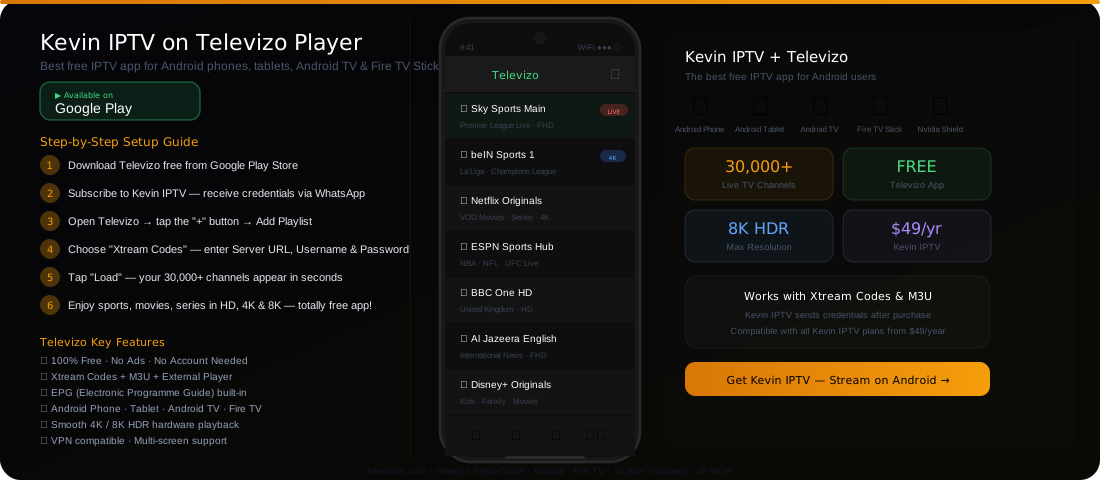
Televizo Works on All Android Devices
How to Set Up Kevin IPTV on Televizo
6 simple steps — takes less than 5 minutes
Download Televizo from Google Play
Search "Televizo" on Google Play Store or Amazon Appstore. Download and install the free app on your Android device.
Subscribe to Kevin IPTV
Choose a plan from $49/year. You'll receive your Server URL, Username, and Password via WhatsApp after subscribing.
Open Televizo and Tap "+"
Launch Televizo and tap the "+" button or "Add Playlist" on the main screen.
Select "Xtream Codes API"
From the playlist type menu, choose "Xtream Codes API" for the best experience. Or choose "M3U URL" if you have a playlist link.
Enter Kevin IPTV Credentials
Type your Server URL, Username, and Password exactly as sent by Kevin IPTV. Tap "Load" or "Confirm".
Start Streaming 30,000+ Channels
All channels, VOD movies, and series load automatically with EPG. Stream in HD, 4K, or 8K quality.
Need help setting up? Kevin IPTV support is available 24/7
WhatsApp Support: +44 7916 998604 →How to Install Televizo on Fire TV Stick
Televizo on Fire TV Stick gives you the best big-screen IPTV experience
Method 1: Amazon Appstore (Easiest)
- 1On your Fire TV Stick, go to the Home screen
- 2Select "Search" and type "Televizo"
- 3Find Televizo in the results and click "Download"
- 4Open Televizo and add Kevin IPTV using Xtream Codes
- 5Enjoy 30,000+ channels on your big TV screen
Method 2: Sideload APK (If Not in Store)
- 1On Fire TV: Settings → My Fire TV → Developer Options
- 2Enable "Apps from Unknown Sources"
- 3Install "Downloader" app from Appstore
- 4Open Downloader and enter the Televizo APK URL
- 5Install the APK and then set up with Kevin IPTV
Why Televizo Is the Best IPTV Player for Android
Trusted by millions of IPTV users worldwide
Completely Free
No ads, no registration, no subscription required for the Televizo app itself.
Fast Channel Switching
Optimised buffer management for instant channel changes with minimal loading time.
Full EPG Support
Built-in TV guide showing current and upcoming programmes across all channels.
VOD & Series
Browse and watch Kevin IPTV's 150,000+ movies and series directly in Televizo.
VPN Compatible
Works with all Android VPN apps for secure, private IPTV streaming.
External Player Support
Use MX Player, VLC, or ExoPlayer for channels requiring special codec support.
Kevin IPTV Plans — Compatible with Televizo
All plans work with Televizo on Android, Fire TV Stick, and Android TV
Simple, Transparent Pricing
No hidden fees. No contracts. Pick the plan that suits you and start streaming 20,000+ channels today.
6 Month Plan
Billed for 6 months
Only $6.67/month
- 20,000+ Live TV Channels
- HD & Full HD Quality
- VOD Library Access
- All Devices Supported
- 24/7 Customer Support
- Anti-Freeze Technology
- Adult Content (Optional)
- Electronic Program Guide
12 Month Plan
Billed for 12 months
Only $4.17/month
- 20,000+ Live TV Channels
- HD, Full HD & 4K Quality
- VOD Library Access
- All Devices Supported
- 24/7 Priority Support
- Anti-Freeze Technology
- Adult Content (Optional)
- Electronic Program Guide
- Catch-Up TV (7 Days)
🔒 Secure • Instant Activation
2 Year Plan
Billed for 24 months
Only $3.13/month
- 20,000+ Live TV Channels
- HD, Full HD & 4K Quality
- VOD Library Access
- All Devices Supported
- 24/7 VIP Support
- Anti-Freeze Technology
- Adult Content (Optional)
- Electronic Program Guide
- Catch-Up TV (7 Days)
- Best Value — Save 80%+
Televizo & Kevin IPTV — FAQ
Common questions about using Kevin IPTV with Televizo Player
Frequently Asked Questions
Everything you need to know about Kevin IPTV subscription service.
Start Streaming Kevin IPTV on Your Android Today
30,000+ channels · 8K quality · Televizo free app · 24/7 support
Get Kevin IPTV — From $49/Year →